
In today’s digital age, the power to create stunning photos is at your fingertips literally. With the advent of photo editing apps, anyone with a smartphone or tablet can become a photography pro. Whether you’re a social media influencer, a professional photographer, or just someone looking to enhance their personal photos, there’s an app for that.
But with hundreds of options out there, how do you choose the right one? In this guide, we’ll explore the best photo editing apps for 2025, breaking down their features, pricing, and ideal use cases. By the end of this article, you’ll know exactly which app suits your needs, from beginner-friendly tools to professional-grade editors.
What Makes a Photo Editing App Stand Out?
Before diving into the apps themselves, let’s talk about what makes a photo editing apps truly exceptional. While different apps offer various features, there are a few key factors that set the best ones apart:
Ease of Use
The best photo editing apps are intuitive and user-friendly. You should be able to start editing with minimal learning curve, especially if you’re a beginner. Look for apps with a clean interface and simple navigation.
Comprehensive Editing Tools
Whether you want to adjust brightness, remove backgrounds, or apply AI-powered filters, the app should offer a wide range of editing tools. Advanced features like RAW editing support and layer-based editing are a plus for professionals.
AI Integration
In recent years, AI has revolutionized photo editing. Apps like Photoshop Express and Luminar Neo use artificial intelligence to automatically enhance images, remove objects, and even colorize black-and-white photos.
Device Compatibility
Some apps are better suited for mobile editing, while others offer desktop versions or work across platforms. Choose an app that fits seamlessly into your workflow, whether you’re editing on your phone, tablet, or laptop.
Cost-Effectiveness
Many photo editing apps are free to use, but they may come with limitations, such as watermarks or fewer editing tools. Premium apps like Lightroom or Affinity Photo may charge for full functionality, but they can be worth the investment for serious photographers.
Top Photo Editing Apps You Should Try
Now that we understand what makes a great photo editing app, let’s dive into the top options available in 2025. Whether you’re a beginner or a seasoned pro, these apps cover all your editing needs.
Adobe Lightroom (Mobile & Desktop)
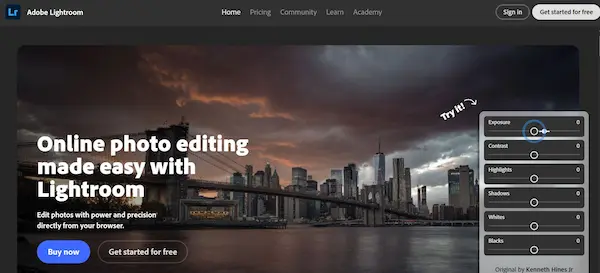
For both beginners and advanced photographers, Adobe Lightroom is a top choice. Offering a range of professional-grade tools, Lightroom is excellent for both RAW photo editing and non-destructive editing. It also supports AI-powered enhancements, such as automatic adjustments to exposure and color balance.
- Features: Advanced color grading, AI auto-enhancements, RAW support, cloud storage.
- Best for: Professional photographers, enthusiasts, social media creators.
- Cost: Free with limited features; $9.99/month for the full version.
Snapseed (Mobile)
Owned by Google, Snapseed is a free mobile app that offers a wide range of editing tools, including RAW support, healing brushes, and vignette effects. It’s simple enough for beginners, yet powerful enough for advanced edits.
- Features: Filters, retouching tools, vignette effects, text overlays, lens blur.
- Best for: Beginners, casual users, on-the-go edits.
- Cost: Free.
PicsArt (Mobile & Desktop)
If you’re looking to get creative with your photos, PicsArt is a fantastic choice. This app includes everything from basic photo editing tools to collage makers, sticker creators, and even video editing features. The app also has an active online community where users share tips and tutorials.
- Features: AI-powered filters, collage maker, video editor, and customizable templates.
- Best for: Social media influencers, creators, and designers.
- Cost: Free with ads; Premium version available for $8/month.
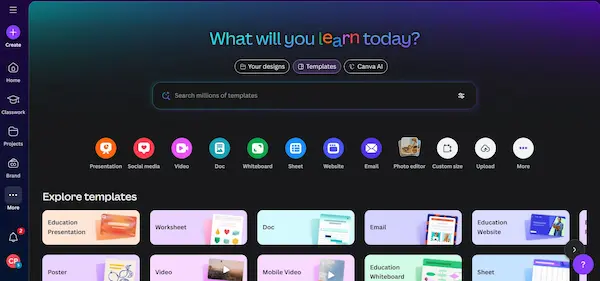
Canva (Mobile & Desktop)
While Canva is widely known for graphic design, it also has robust photo editing capabilities. With templates for social media posts, invitations, and more, Canva makes it easy to create visually appealing content quickly.
- Features: Drag-and-drop design tools, templates, text overlays, filters.
- Best for: Social media creators, marketers, and graphic designers.
- Cost: Free with limited templates; Pro version available for $12.95/month.
Photoshop Express (Mobile)
A lighter version of Adobe’s flagship software, Photoshop Express brings powerful editing tools to your mobile device. With easy-to-use tools for cropping, color correction, and applying effects, it’s an excellent option for quick edits on the go.
- Features: Color correction, text overlays, blending modes, and quick fixes.
- Best for: Casual users, photo editors on the go.
- Cost: Free with in-app purchases.
Luminar Neo (Desktop)
For those looking to take their editing to the next level, Luminar Neo is an AI-powered photo editor designed for professionals. It includes tools like AI sky replacement, portrait enhancements, and noise reduction, making it a great option for photographers who need high-end results without spending hours in Photoshop.
- Features: AI sky replacement, portrait tools, AI denoise, layers.
- Best for: Professional photographers, serious enthusiasts.
- Cost: $79 for a one-time purchase.
How to Choose the Best Photo Editing Apps for Your Needs
With so many photo editing apps available, choosing the right one can feel overwhelming. Here are a few tips to help you make the best decision based on your needs:
Consider Your Skill Level
If you’re new to photo editing, start with an app like Snapseed or PicsArt. These apps are user-friendly and offer all the essential tools you need to enhance your photos without a steep learning curve.
For advanced users who need full control over their edits, apps like Lightroom or Luminar Neo are better suited for professional workflows.
Identify Your Editing Needs
What exactly are you looking to do with your photos? If you’re primarily focused on social media content, apps like Canva and PicsArt are great for quick edits and design work. For professional photography, Lightroom or Photoshop Express are essential for precise editing and RAW support.
Look for AI Features
AI features can dramatically reduce editing time while providing high-quality results. Apps like Luminar Neo and Photoshop Express offer powerful AI tools to automate tasks like sky replacement or portrait retouching.
Evaluate Pricing
While free apps like Snapseed are excellent for casual editing, paid apps like Lightroom and Luminar Neo offer advanced features that justify the cost for serious photographers.
5 Photo Editing Mistakes You Should Avoid
Even the best editing apps can’t fix everything. Here are common mistakes to avoid:
Overusing Filters
Filters can be fun, but overuse can make your photos look unnatural. Aim for subtle adjustments rather than heavy-handed edits.
Neglecting Resolution
Always save your edits in high resolution, especially if you plan to print your photos or use them for professional work.
Ignoring Composition
Remember that editing can’t fix poor composition. Focus on getting the shot right first, then enhance it with editing.
Excessive Retouching
While removing blemishes and smoothing skin can enhance photos, too much retouching can make images look artificial.
Not Saving Your Work
Always save your edited photos in multiple formats. Whether you’re uploading to social media or printing them, having different file types will help you avoid issues with quality.
Find the Right Photo Editing App for You
Choosing the best photo editing apps ultimately depends on your specific needs, budget, and editing expertise. Whether you’re editing casually for social media or working on high-end professional projects, there’s an app that fits your style.
Don’t hesitate to try out a few apps to see which one feels right for you. Remember, photo editing is about creativity and expression, so have fun experimenting with different tools!
Have you used any of these apps? Share your experience in the comments below, or let me know which photo editing apps you think is the best in 2025!